BUILT FOR SOLE TRADERS AND SOLE PROPRIETORS
Bookkeeping Made
Effortless
Zero learning curve. No recurring SaaS subscriptions. Replace chaotic shoeboxes and bloated accounting software with a clean, single spreadsheet file built for immediate clarity.
One-time purchase · Instant Excel download · Built in the format accountants ask for
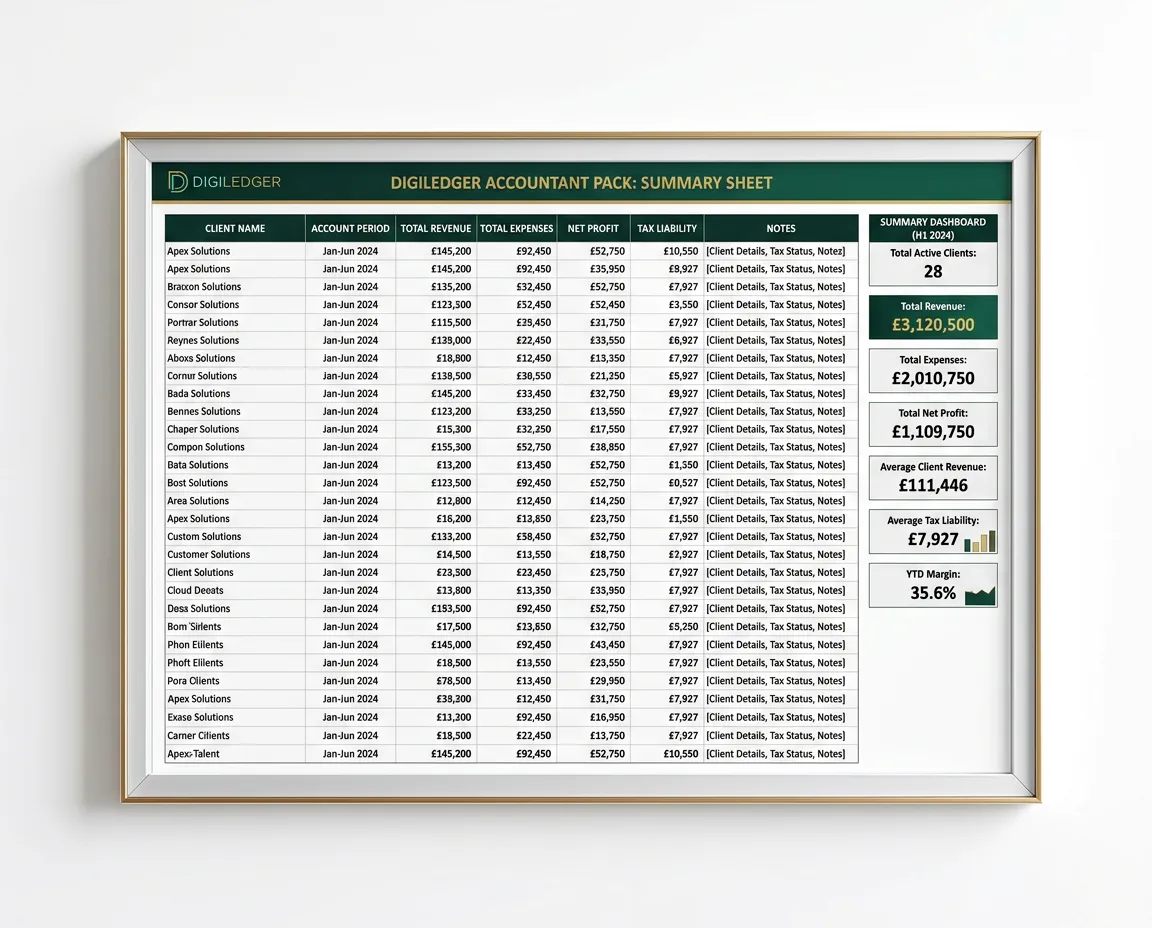
FIG. 1.0 — THE YEAR-END ACCOUNTANT PACK SUMMARY TAB
THE 3-STEP LEDGER FLOW
Three Steps To
Done
No recurring SaaS overhead or hidden complexity. Experience the timeless efficiency of an editorial spreadsheet system built to keep your books balanced in minutes each month.
THE YEAR-END PANIC
The Dread Of The
Carrier Bag
It starts around November as a quiet background hum, then turns into full-blown paralysis by mid-January. You know the exact physical sensation: opening that bottom drawer or wardrobe corner and staring down at a wrinkled paper bag overflowing with faded fuel receipts, coffee invoices, and curled-up card slips from eleven months ago.
Every business owner promises themselves: 'This year I will log every expense on the day it happens.' But you were busy delivering actual work, servicing clients, and keeping projects moving. Nobody wrote it down as they went. So now you face three lost weekends scrolling through twelve months of mobile banking exports, trying to decode cryptic merchant codes on Sunday evening.
The email you're dreading looks something like this:
"Hi, we have started your year-end return. Could you urgently clarify 11 untagged transactions from October, find the VAT invoice for the £1,420 equipment purchase, and explain why your closing bank balance differs by £842.15 from your recorded income?"
The standard follow-up: a clean-up charge you knew was coming, just to sort out disorganized figures before they could even file your return.
You do not need a bloated cloud subscription that costs £35 every single month and demands endless bank re-authorizations. You just need to never experience that sickening carrier-bag panic ever again.
Log Money In
Record daily client receipts, invoice payments, and automated gateway transfers into simple, structured fields without category confusion.
Log Money Out
Track vendor payouts, software subscriptions, and tax-deductible items. Built-in formulas immediately segment deductible categories.
Accountant Pack
A one-page summary you print or PDF straight from Excel and send.
TAB-BY-TAB ARCHITECTURE
The Complete
Workbook
Nine purpose-built tabs, structured in order. You fill in two lists. The rest is totals and a year-end pack.
Start Here
A one-page guide to how the workbook fits together — read it once before you enter figures.
Setup
Business name, tax year, opening bank balance and your tax set-aside percentage - filled in once.
Money In
Log every payment you receive, with clean monthly totals and a running total as you go.
Money Out
Track operating costs by category so your year-end totals are easy to pull.
Mileage & Home
Calculate statutory vehicle allowances (HMRC / IRS rates) and simplified home office flat rates without guesswork.
Pay Yourself
What you've taken out, what to set aside for tax, and what's genuinely safe to draw.
For Accountant
Three year-end figures: unpaid invoices, unpaid bills, and stock on hand.
Check
Reconciles to your bank statement and counts anything that would quietly break a total: payments with no category, no date, no account, or outside your tax year. Most spreadsheets let you get it wrong in silence. This one puts a number on it.
Accountant Pack
A one-page summary set up to print or PDF straight from Excel.
REGIONAL EDITIONS
Tailored To Your
Tax Code
Two editions, with category names that match the boxes your accountant is working from: SA103 for the UK, Schedule C for the US.
2026/27 TAX YEAR READY
United Kingdom Edition
Pre-configured for HMRC Self Assessment rules, UK sole traders, and the exact categories accountants expect at year end.
- HMRC Tiered Mileage Rules: Auto-split at 45p/mile for first 10,000 miles, 25p thereafter
- Simplified Expenses Engine: Flat-rate home working allowances based on monthly hours logged
- Self Assessment ready: category names match the SA103 expense boxes, so your accountant isn't translating anything
- Fixed expense categories: aligned to SA103, no custom category builder
2026 CALENDAR YEAR EDITION
United States Edition
Engineered specifically for US freelancers, single-member LLCs, and 1099 independent contractors preparing annual Schedule C returns and quarterly vouchers.
- IRS Schedule C (Form 1040) Mapping: Direct correlation with Part II line-item deduction boxes
- IRS standard mileage, split automatically across the two rates that applied in 2026 - and the rates are entry cells you update each January
- Log each 1040-ES payment and see how you're tracking against your set-aside target, with the federal due dates listed.
- Contract labor tracked by payee, so you can see who crosses the $600 1099-NEC threshold
PRE-QUALIFICATION CRITERIA
Is DigiLedger
For You?
We believe in radical transparency. DigiLedger was intentionally engineered for focused small operations - not complex corporate conglomerates. Please review this checklist before ordering.
IDEAL FIT
Who DigiLedger Is Built For
Designed from the ground up for agile operators who prioritize clear record-keeping without unnecessary subscription fees.
- Sole traders and self-employed professionals tracking simple revenue and business expenses
- Single-member LLCs operating on a straightforward cash-basis tax model
- Freelancers, consultants, and creators who need clean annual accountant packs
- Room for 500 payments in and 500 out across the year
- Operators who prefer full spreadsheet ownership with a single, one-time payment
NOT RECOMMENDED
Who Should Not Buy DigiLedger
Please do not purchase DigiLedger if your regulatory framework demands complex double-entry or enterprise automation.
- Incorporated companies (UK Ltd), and US S-corps, partnerships or multi-member LLCs
- Organizations running multi-tier employee payroll systems with tax withholdings
- E-commerce stores needing automated barcode or warehouse SKU inventory tracking
- Large teams requiring simultaneous multi-user permissions and role-based access
- Companies requiring active automated bank API feeds and continuous live syncing

THE ACCOUNTANT'S PERSPECTIVE
Why Your Accountant
Will Thank You
Every practice has clients who arrive with a carrier bag and a shrug. Cleaning that up is the least profitable work in the building, and the client resents the bill for it. This is the file that stops it happening, and it costs the practice nothing.
- Zero back-and-forth email chains over uncategorized expenses
- One page to print or PDF and send
- A clean handoff format that keeps year-end simple
CLARITY BEFORE YOU COMMIT
Common
Questions
Direct, candid answers regarding compliance, spreadsheet compatibility, and why we refuse to lock your business data inside a recurring SaaS subscription.
Do I need prior bookkeeping or accounting knowledge to use this?
None at all. If you can copy and paste from your bank, and pick a category from a dropdown, you're fine. The Check tab flags missing categories, missing dates, and anything that would quietly throw totals off.
Does DigiLedger make me compliant with Making Tax Digital?
No, and be wary of any spreadsheet that says it does. Under MTD for Income Tax you must keep digital records and send quarterly updates through MTD-compatible or bridging software. A spreadsheet on its own doesn't satisfy that.
The thresholds are based on gross self-employment and property income: over £50,000 from April 2026, over £30,000 from April 2027, over £20,000 from April 2028.
Below those thresholds, DigiLedger does exactly the job it's built for: your accountant files your Self Assessment once a year from it. Above them, it still works as your record-keeping, provided your accountant submits the quarterly updates using their own compatible software. If you're unsure which side of the line you're on, ask your accountant before you buy.
Does the workbook automatically file my tax return?
No, and deliberately so. DigiLedger structures your figures into a one-page year-end summary you can send to your accountant.
What spreadsheet software do I need to run DigiLedger?
Microsoft Excel on Windows, Mac, or Excel for the web. It's a standard .xlsx, so your accountant can open it too. It isn't built for Google Sheets: some of the dropdowns and protections don't survive the import, so please don't buy it for that.
Is this genuinely a one-time payment with no subscription?
Exactly that. One upfront payment and you own the edition you buy. No hidden maintenance fees, no tier lockouts, and no monthly debits.
What happens if I accidentally overwrite or break a formula?
You can't, by accident. Formula cells are locked and only the cells you're meant to type in are open. There's no password on it, so if you ever do want to get in and change something, you can.
Does it do VAT returns or sales tax returns?
No. It doesn't do VAT returns or sales tax returns. If you're VAT registered you'd enter figures excluding VAT and handle VAT separately. Same for US sales tax: keep it out of these figures, it was never your income.
What if I outgrow it?
Then you move to proper accounting software, and a year of clean records is a very good thing to arrive with.
LIFETIME OWNERSHIP • NO RECURRING FEES
One File. One Price.
Zero Subscriptions.
Select your tax jurisdiction below. Download instantly, customize in seconds, and retain full perpetual ownership without monthly software overhead.
30-day refund. If DigiLedger isn't what you expected, email us within 30 days and we'll refund you in full. By downloading immediately you agree the download starts straight away; we honour the 30-day refund regardless.
The structured bookkeeping system built for modern ledger precision and stress-free tax preparation.
Legal & Regulatory Disclaimer: DigiLedger provides structured digital spreadsheets, automated workflow templates, and record-keeping spreadsheets and templates designed for self-employed professionals, freelancers, and small business owners. DigiLedger is not an accounting firm, chartered practice, or registered tax advisory service. Use of DigiLedger does not constitute professional tax, financial, accounting, or legal counsel. Users remain solely responsible for validating their figures and consulting a qualified CPA, Chartered Certified Accountant, or licensed tax professional for statutory compliance and official filings.
© 2026 DigiLedger. All rights reserved. Precision Bookkeeping Architecture.